
Transaction Refunds
This feature allows you to return a payment to a customer. An example of a transaction refund scenario is when an e-commerce customer picks five items and makes a payment for the five of them. On arrival of the products, the customer could decide to only keep three of the items and return the rest. Upon return, the customer would have to be refunded for the two returned products by the merchant.
See Transaction Refund API for more information on implementing it on your platform.
Types of Refunds
Partial Refund: A part of the total transaction amount is to be refunded. The customer will be refunded a part of the initial full payment.
Full Refund: The total transaction amount is to be refunded.
Charges
For payments made via transfers, you will be charged a refund fee of N10 and this will be deducted from your wallet. You are required to have your wallet funded before refunds can be processed.

Monnify does not refund to virtual account numbers. If the original payment was made via a virtual account, refunding to that same account will fail. In such cases, the merchant must collect a regular bank account number from the customer and specify it as the refund destination. See Refunding to a Different Account below.
Refund via API
Refund are not enabled by default. You must request activation for the API (and UI - if needed) to be enabled both your Sandbox and/or Live environments. Contact [email protected] to get this enabled stating your use case for the feature. As part of the email, you will be expected to idemnify Monnify for potential use and misuse of the feature on your platfrom.
All refund API calls require a valid bearer token. Authenticate first using your API key and secret, then use the returned token in the Authorization header.
Partial Refund
A partial refund returns only a portion of the original transaction amount. Set refundAmount to any value less than the full transaction amount.
Full Refund
A full refund returns the entire transaction amount. Set refundAmount to the original transaction amount. You can optionally specify a different destination account; if omitted, the refund is sent back to the originating account.
Refunding to a Different Account
By default, Monnify sends the refund to the account that made the original payment. You can override this by supplying destinationAccountNumber and destinationAccountBankCode in the request body.
Monnify does not refund to virtual account numbers. Virtual accounts are temporary receive-only accounts — transfers back to them will fail. If a customer paid through a virtual account (i.e. a dynamic account number generated for the transaction), ask them to provide a regular bank account number and use it as the destinationAccountNumber when initiating the refund.
Request Fields
| Field | Type | Required | Description |
|---|---|---|---|
transactionReference | string | Yes | The unique transaction reference generated by Monnify for the original payment. |
refundReference | string | Yes | A unique reference you generate to identify this refund. Must be distinct for each refund request. |
refundAmount | number | Yes | Amount to refund. Must be between ₦100 and the original transaction amount. For a full refund, set this to the full transaction amount. |
refundReason | string | Yes | Internal reason for the refund (max 64 characters). Used for your records. |
customerNote | string | Yes | Narration that appears on the customer's bank credit alert (max 16 characters). |
destinationAccountNumber | string | No | Account number to send the refund to. If omitted, the refund is sent back to the originating account. |
destinationAccountBankCode | string | No | Bank code for the destinationAccountNumber. Required if destinationAccountNumber is provided. |
Response
| Field | Description |
|---|---|
refundType | PARTIAL_REFUND or FULL_REFUND. Determined automatically based on whether the refund amount equals the full transaction amount. |
refundStatus | Current status of the refund. See statuses below. |
refundStrategy | Indicates how the refund is funded. For example, MERCHANT_WALLET means the refund amount is debited from your Monnify wallet. |
comment | A human-readable message about the refund's current state. |
| refundStatus | Meaning |
|---|---|
PENDING | Refund has been accepted and is being processed. |
COMPLETED | Refund was successfully sent to the customer's account. |
FAILED | Refund could not be processed. Check the error codes section for details. |
Get Refund Status
Poll this endpoint to check the current status of a refund using the refundReference you supplied when initiating it.
Polling is useful for a one-time status check, but for production systems configure a webhook URL to receive real-time refund notifications instead. See the section below.
Refund Webhooks
Monnify sends a webhook notification to your configured URL when a refund reaches a terminal state. There are two refund event types:
Successful Refund
Sent when the refund has been processed and the customer's account has been credited.
Failed Refund
Sent when the refund could not be processed. Use the refundReference to look up further details or surface an error to your support team.
Setting Up Your Webhook URL
Configure your webhook URL in the Monnify dashboard under Settings > API Keys & Webhooks. All webhook notifications include a monnify-signature header containing an HMAC-SHA512 hash of the request body signed with your client secret. Always verify this signature before processing the payload.
- Respond with HTTP
200immediately on receipt. Do your processing after acknowledging. - Verify the
monnify-signatureheader before trusting the payload. - Check for duplicate notifications using
refundReferencebefore crediting or updating order state. - Whitelist Monnify's IP addresses on your server firewall.
See Webhooks & Event Types for the full signature verification guide and code samples in Node.js, PHP, and Java.
Refund From Monnify Dashboard
To initiate a refund on a particular transaction, click on the transaction to view its details as shown below;
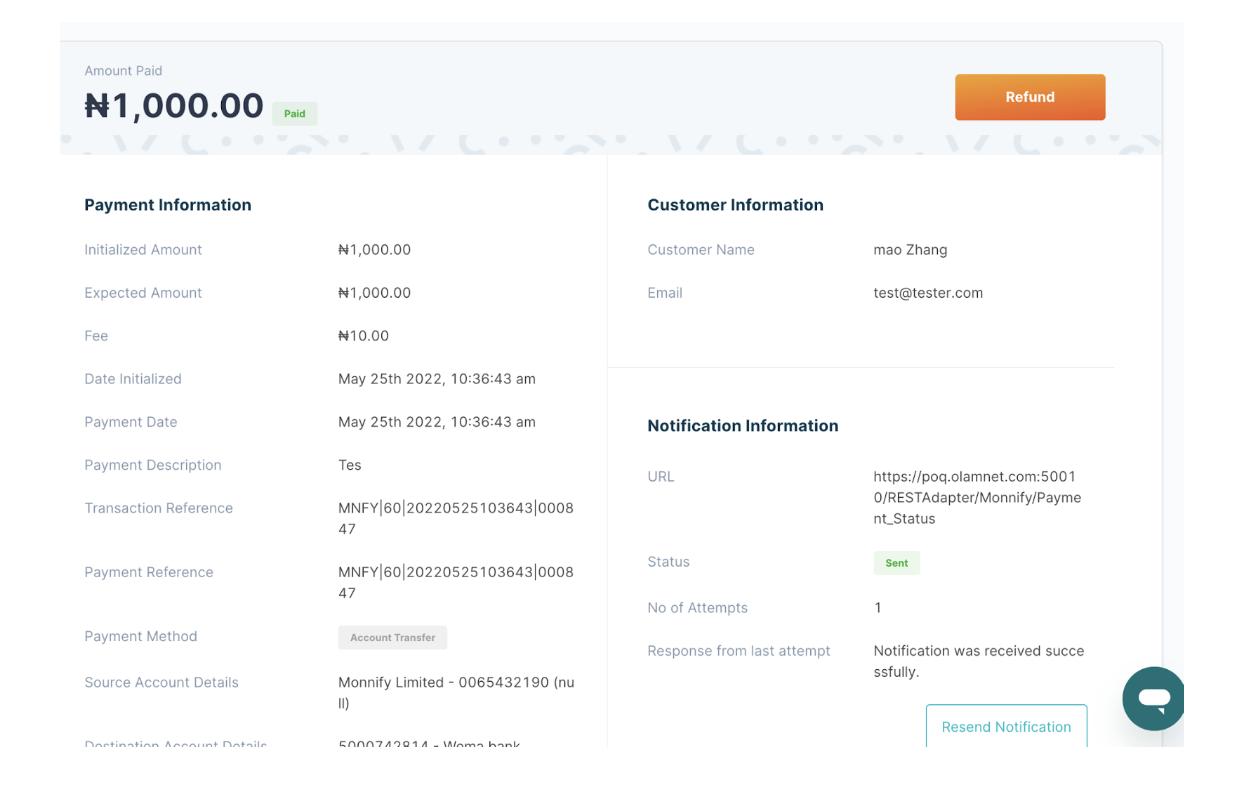
Clicking on the "Refund" button takes you to the refund page;
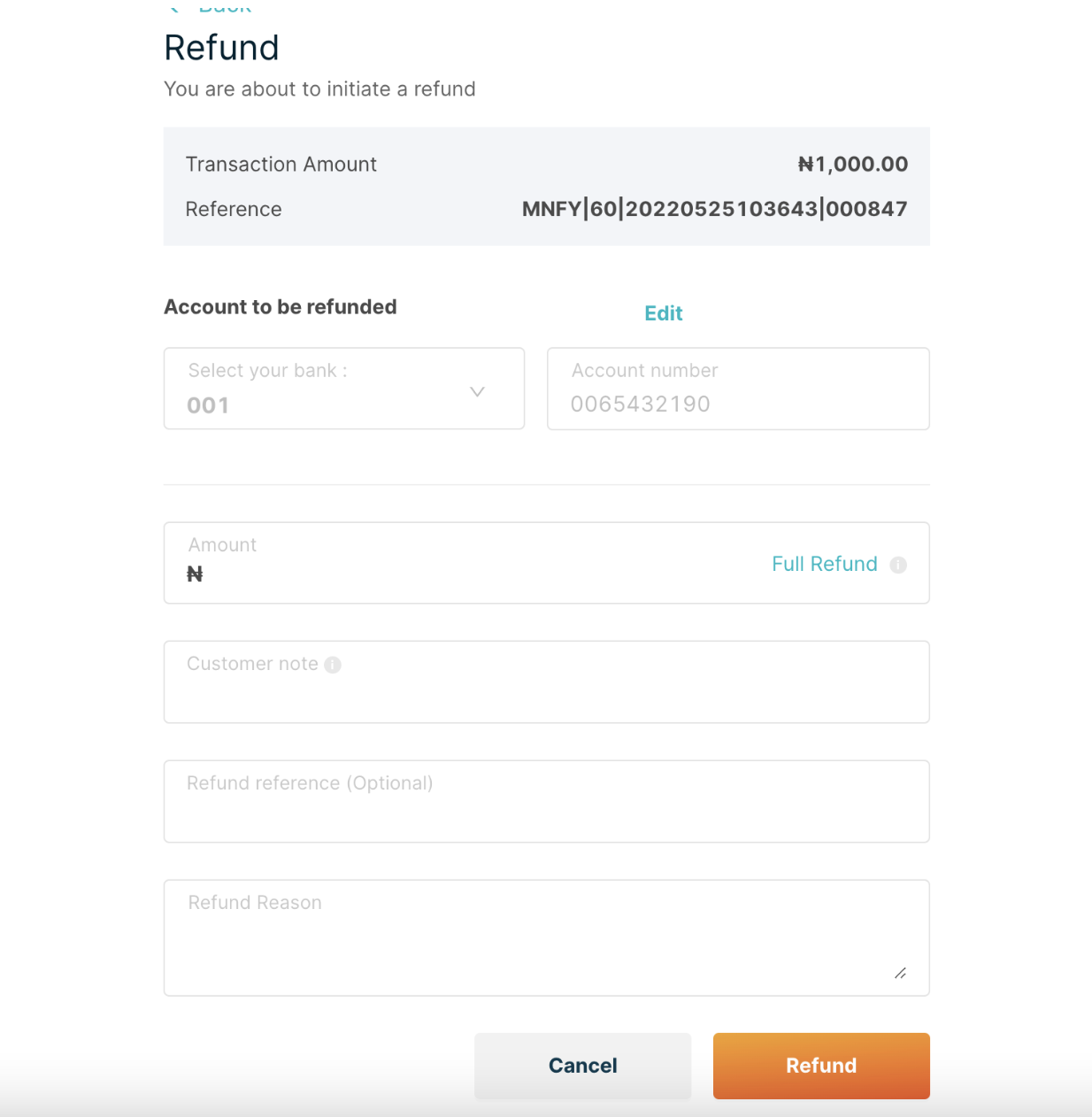
Finally populate the necessary fields and click on the refund button to perform a refund on such transaction.
Sample Error Messages
| Error Message | Meaning | Action |
|---|---|---|
99 | Error occurred while processing your request. | Engage the Monnify support |
R1 | Transaction with specified reference does not exist. | Recheck if there's a transaction with such reference. |
R2 | Refund not permitted for specified transaction. | Refund is currently only possible for payments via Account_Transfer. Recheck if the transaction is an Account_Transfer payment. |
R3 | Specified refund amount is above transaction amount. | Recheck the transaction amount and retry accordingly. |
R4 | Specified refund amount is below minimum refundable amount. | The minimum refundable amount is N100 |
R5 | Merchant does not have sufficient funds to process refund. | Merchant should topup his Monnify wallet and retry. |
R6 | Customer account details are invalid | Merchant should request valid account details from the customer or try again later. |
R7 | No refund was initiated with the supplied refund reference. | Kindly recheck if a refund with the refund reference was successfully initiated. |
R8 | Supplied value has exceeded the maximum allowed number of characters. | The refundReason should not be more than 64 characters and the customerNote should not be more than 16 characters. |
R9 | Supplied refund reference already exists for the merchant. | Kindly use a new and distinct refund reference. |
R10 | Merchant account balance could not be retrieved. | Contact Monnify's support. |
R11 | Name inquiry network error. | Kindly retry later or Contact Monnify's support. |
R12 | The total amount of all refunds done on a particular transaction has exceeded the transaction amount. | No refunds can be done for the particular transaction as the total amount of partial refunds have summed up to the transaction amount. |
M01 | System error. Contact support. | Contact Monnify's support. |
M02 | System error. Contact support | Contact Monnify's support. |
Rate this page
How helpful is the content on this page?

Got Questions

Monnify Tutorial Videos


