
Card Tokenization
Tokenize a customer's card during their first payment so you can charge them again in the future (subscriptions, renewals, or one-click payments) without requiring them to re-enter their card details.
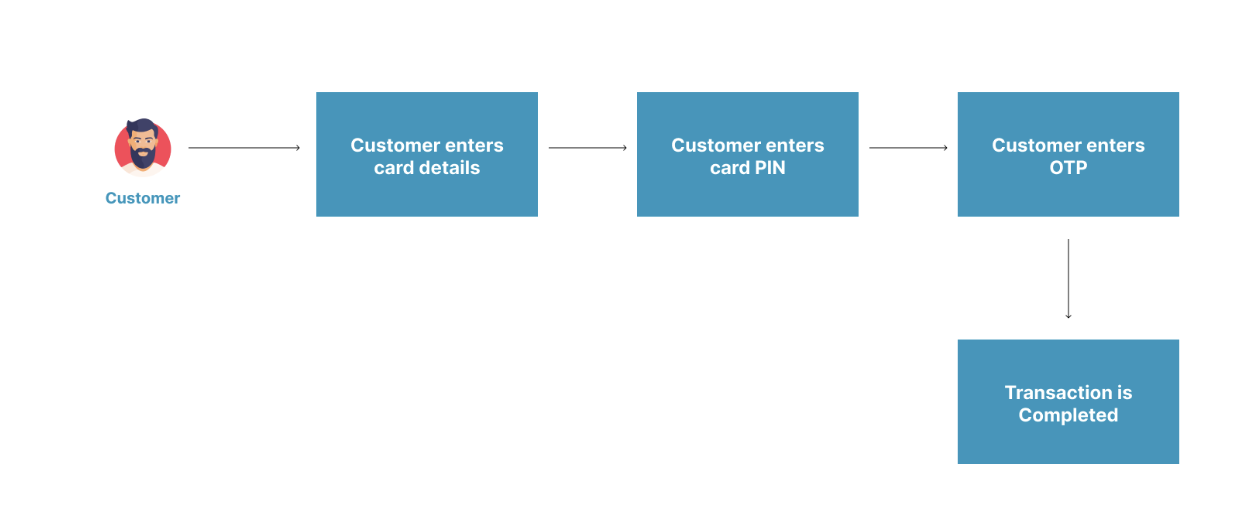
Card Tokenization allows you to debit a customer's card automatically on future transactions, without requiring any input from the customer. After the customer completes their first card payment with tokenization enabled, Monnify generates a secure token representing their card. You store this token and use it to charge them on subsequent payments.
How It Works
- The customer makes their first payment using the Monnify checkout or SDK. If tokenization is enabled on your merchant account, Monnify will automatically generate a card token on successful payment.
- On successful payment, you call the Get Transaction Status API to retrieve the
cardTokenfrom thecardDetailsobject. - You store the
cardTokensecurely on your server, linked to the customer's account and email address. - For future charges, you send the
cardTokento the Charge Card Token API with no checkout UI required.

Card tokenization must be activated on your integration before use. Contact [email protected] to enable this feature on your account.
Step 1 – Collect the First Card Payment
If card tokenization is enabled on your merchant account, Monnify automatically returns a card token after any successful card payment — no additional parameter is needed in your SDK call.
Web / JS SDK
Initialize a standard card payment. The token is returned automatically if tokenization is enabled on your account.
Flutter SDK
Initialize a standard card payment. The token is returned automatically if tokenization is enabled on your account.
iOS SDK
Initialize a standard card payment. The token is returned automatically if tokenization is enabled on your account.
Step 2 – Retrieve the Card Token
After the first payment completes, call the Get Transaction Status API using the transaction's transactionReference or paymentReference. The cardDetails object in the response contains the cardToken.
In the sandbox environment, Monnify does not return a real cardToken. Instead, check the supportsTokenization field in reusable: true means the card would produce a token in production, and false means it would not.
Step 3 – Store the Card Token
Once you have the cardToken, store it securely on your server alongside the customer's email address used for the original transaction. Both the token and the email must match on every subsequent charge, as Monnify validates this pair.
- Treat the token like a sensitive credential and store it encrypted at rest.
- Never expose the token to the client (browser or mobile app).
- Link the token to the customer's internal user ID so you can retrieve it when scheduling future charges.
Step 4 – Charge the Token (Future Payments)
Use the stored cardToken to charge the customer for future payments. This call happens entirely server-to-server, with no checkout UI required.
Token Lifecycle & Best Practices
- One token per card per merchant: if the same customer tokenizes the same card twice, you get the same token.
- Expired cards: the token becomes invalid when the underlying card expires. Re-collect card details from the customer and tokenize again.
- Customer consent: always inform customers that you are saving their card for future charges. This is a regulatory and trust requirement.
- Webhook on charge: Monnify sends a webhook notification for every token-based charge, just like a regular payment. See Webhooks.
- Verify every charge: always call the Verify Transactions API after a token charge before delivering value.
Sample Error Messages
| Error Message | Meaning | Action |
|---|---|---|
| Card token has expired. | The supplied token has expired. | Ask the customer to complete a new card payment with tokenization enabled to generate a fresh token. |
| Invalid card token | The token supplied in the request does not exist or is malformed. | Verify that the token stored in your database matches what was returned from the Get Transaction Status API. |
| Duplicate payment reference | The paymentReference used in the init-transaction request was already used in the same environment. | Generate a unique reference for every new transaction. |
Rate this page
How helpful is the content on this page?

Got Questions

Monnify Tutorial Videos


