
Settlements
Settlement is the process of Monnify crediting your wallet or bank account for payments received on your behalf (payments made by your customers). At settlement time, all payments received from your customers are made available to you by crediting your wallet on Monnify and optionally moving the funds to your external bank account.
Settlement Time and How It Works
The Settlement Cycle describes the frequency of settlement, i.e. how often a beneficiary is credited for payments received on their behalf.
There are two types of settlement cycles.
- Same Day Settlement - Transactions are settled to the beneficiary in bulk at the agreed settlement time (10 PM on the day the payment is received).
- Express Settlement - Allows merchants to instantly withdraw their available balance on demand, up to 3 times per day, without waiting for the scheduled settlement window.
Default Settlement Cycles for Monnify Merchants
| Payment Method | Settlement Cycle (₦) |
|---|---|
| Account Transfer/Card/USSD/Phone Number | 10 PM same day |
| Direct Debit | 10 PM same day |
How It Works
- A transaction is performed on Monnify by your customers.
- Internal postings required for the transaction to be settled to merchant is done. Time of this internal posting is dependent on the settlement trigger of the payment provider powering the payment method.
- At merchant’s settlement time, if internal posting required on transaction has been completed, funds are moved from settlement payable account to merchant’s wallet account number.
- If merchant has external sweep enabled, funds are moved to merchant’s bankaccount via Atlas.
Express Settlement
Express Settlement lets you access your pending funds on demand, without waiting for the scheduled 10 PM window. It is available to all Monnify merchants and works on weekends and public holidays.
| Detail | Value |
|---|---|
| Daily limit | 3 requests per day |
| Minimum amount | ₦5,000 |
| Maximum amount | No limit |
| Cost | Free |
| Access | Monnify dashboard only (not via API) |
How to Request an Express Settlement
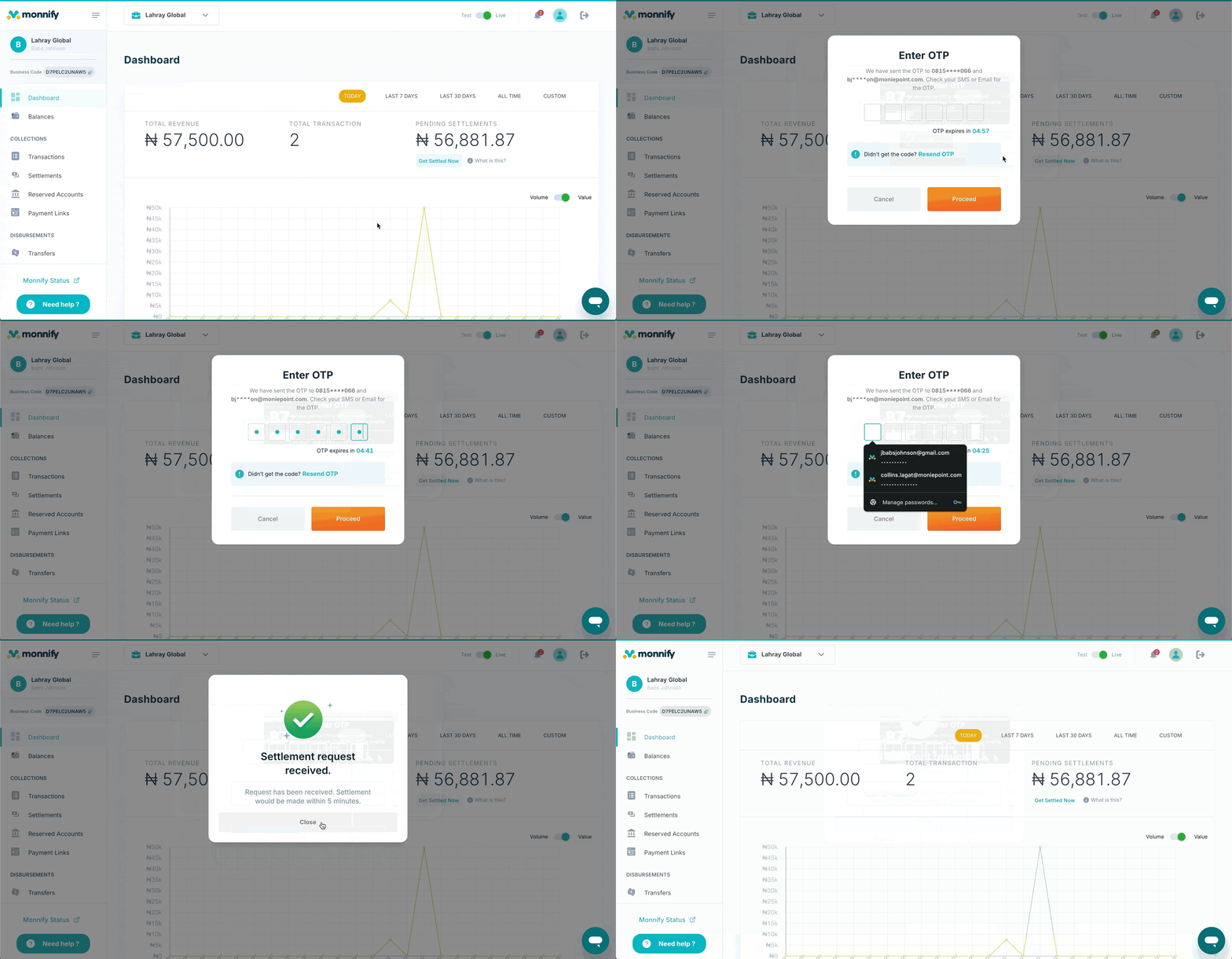
- Log in to your Monnify dashboard at app.monnify.com.
- Locate the Get Settled Now button beneath your pending settlement balance.
- Select your settlement destination: Wallet or Bank Account.
- If you selected Bank Account, choose your preferred settlement account and proceed.
- Enter the OTP sent to your registered contact to authorise the request.
- Once the OTP is verified, your outstanding settlements are transferred to your account in real time.
Settlement Retrieval API
You can get information about any settlement done on your behalf by Monnify. You can get information about a settlement either by using settlement reference or transaction reference. For more details on implementation, check Get Transactions By Settlement Reference API and Get Settlement Information For Transaction.
Settlement Webhook
The Settlement webhook notifies merchants via API whenever settlement has been successfully made to his settlement destination(Wallet or Bank Account). Sample payload format for the settlement notification and hash calculation is found in the Webhook section.
Rate this page
How helpful is the content on this page?

Got Questions

Monnify Tutorial Videos


