
Single Transfers
The Monnify Single Transfer API allows you to send money directly to a bank account or mobile wallet in real time. This guide walks you through the prerequisites and the full integration flow.
Before You Begin
Before integrating the Single Transfer API, make sure you have completed the following steps:
- Enable Disbursements on your account
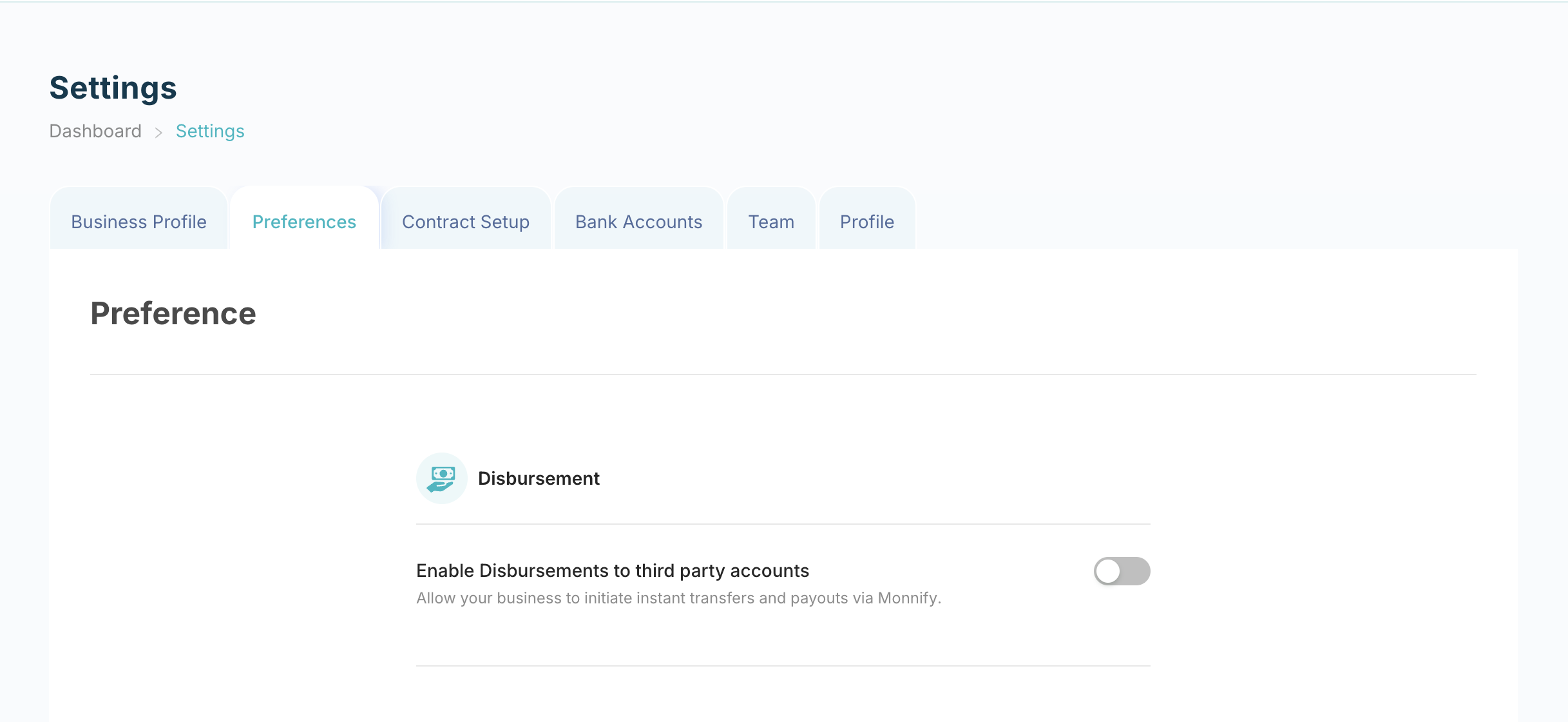
Disbursements is not enabled by default on Monnify. To request access, navigate to Settings > Preferences on your Monnify dashboard. Under the Disbursements section, enable the "Enable Disbursements to third party accounts" toggle. This automatically submits a request for your account. Once submitted, the request will be reviewed internally before the feature is approved and enabled for your account.
- Whitelist your server IP address
For security in the Live environment, Monnify only processes disbursement requests from whitelisted static IP addresses. After you submit your disbursement enablement request from the dashboard, our team will send a follow-up email to your registered business email address requesting the information required to complete the setup, including the static IP address(es) to be whitelisted.
Once your IP address(es) have been whitelisted and the feature has been approved, you can begin making disbursement requests. If you need to whitelist additional IP addresses after your account has been configured, contact [email protected]. Requests originating from IP addresses that have not been whitelisted will be rejected with a D06 error.
- Understand how MFA (OTP) works
Multi-Factor Authentication (MFA) via OTP is enabled by default for all disbursement accounts in both Sandbox and Live instances. When MFA is active, each transfer request will return a
PENDING_AUTHORIZATIONstatus and require you to submit an OTP before the transfer is processed. The OTP is sent to the registered email address on your Monnify account.If your integration handles transfers programmatically and you do not need OTP authorization, you can request for MFA to be disabled by contacting [email protected].
- (Optional) Enable Transaction validation
For an additional layer of authorization, you can enable Transaction validation, which requires your server to explicitly approve a transfer before Monnify processes it.

You can send merge and send the requests above as a single email. As part of the email, you will be expected to idemnify Monnify for potential use and misuse of the feature on your platfrom.
Integration Flow
Once your account is set up, here is the typical flow for a single transfer:
- Initiate the transfer: your server sends a transfer request to Monnify.
- If MFA is enabled, authorize the transfer by submitting the OTP received via email.
- Poll or receive a webhook notification for the final transfer status.
Initiating a Transfer
Make a POST request to the Initiate Transfer (Single) API with your transfer details. The response will differ depending on whether MFA is enabled on your account.
Before initiating a transfer, use the Name Enquiry API to look up and verify the recipient's account. The name returned should be passed as the destinationAccountName in your request. Submitting a mismatched name will cause the transfer to fail. To get the correct destinationBankCode, use the Get Banks API to retrieve the full list of supported banks and their codes.
Response (MFA enabled, OTP required):
Response (MFA disabled, transfer proceeds immediately):
Authorizing a Transfer (MFA / OTP)
If your account has MFA enabled and you received a PENDING_AUTHORIZATION status, you must authorize the transfer by submitting the OTP sent to your registered email. Make a POST request to the Authorize Transfer (Single) API.
Resending an OTP
If the OTP was not received or has expired, you can request a new one via the Resend OTP API.
Asynchronous Transfers
By default, Monnify processes transfers synchronously and your server waits for a final status. If you prefer not to block your server, you can process transfers asynchronously by setting async to true in your request. Monnify will send the final status to your webhook URL once the transfer is processed.
Transfer with Sender Details
You can specify the actual sender's details on a transfer so that the recipient's bank statement shows the real sender rather than your business name. This is particularly useful for platforms that process transfers on behalf of other parties. Include a senderInfo object in your request payload.
Getting Transfer Status
To check the status of a transfer, make a GET request to the Single Transfer Status API with the transaction reference.
Getting All Transfers
You can retrieve a paginated list of all single transfers from your account by making a GET request to the Get All Single Transactions API. Provide pageNo (starts at 0) and pageSize as query parameters.
Searching Disbursement Transactions
To search across all your disbursement transactions, make a GET request to the Search Disbursement Transactions API. You can filter by reference, status, date range, and more.
Getting Your Wallet Balance
You can check the available balance in your Monnify disbursement wallet at any time by making a GET request to the Wallet Balance API.
Transaction Status Reference
| Status | Description |
|---|---|
PENDING, AWAITING_PROCESSING and IN_PROGRESS | The transaction is still being processed. Re-query to get the final status. |
| PENDING_AUTHORIZATION | MFA is enabled and the transfer is waiting for OTP authorization before it can be processed. |
| OTP_EMAIL_DISPATCH_FAILED | Monnify could not send the OTP email. Use the Resend OTP API to request a new one. |
| SUCCESS and COMPLETED | The disbursement was processed successfully and the recipient has been credited. |
| REVERSED | The disbursement was reversed. The funds have been returned to your wallet. |
| FAILED | The disbursement was not successful. Check the error message for the reason. |
| EXPIRED | The transaction was not authorized within its validity period. Initiate a new transfer. |
Error Reference
| Error Code | Meaning | Recommended Action |
|---|---|---|
| 99 | An unexpected error occurred while processing the transaction. | Re-query to confirm the transaction status before retrying. |
| D01 | Something went wrong and the transaction could not be processed. The actual error will be in the | Treat as Failed. |
| D02 | Transaction does not exist. | Treat as Failed. |
| D03 | Invalid account details supplied. | Treat as Failed. |
| D04 | Insufficient wallet balance. | Top up your Monnify wallet and retry. |
| D05 | The reference supplied has already been used for a previous transaction. | Retry with a new unique reference. |
| D06 | Unauthorized request. The request originated from an IP address that is not whitelisted. | Send your server IP address to [email protected] for whitelisting. |
| D07 | Duplicate request. A transfer to the same account for the same amount was made within a 2-minute window. | Retry after 2 minutes, or contact [email protected] to disable duplicate detection. |
| Invalid destination account number | The account number did not pass name enquiry validation. | Ask the customer to provide a valid account number. |
| Dormant beneficiary account | The recipient's account is dormant. | The customer should contact their bank. |
| Beneficiary account name mismatch | The account name does not match the account number. | Ask the customer to reconfirm their account details. |
| Unknown destination bank code | The bank code supplied is not recognized on Monnify. | Confirm the correct |
Transaction timed out while waiting for destination bank | The recipient's bank did not respond in time. | Re-query the transaction status. |
| Invalid amount | The transaction amount is invalid. | Confirm the transaction amount and retry. |
| Delayed processing from NIP | Delay from the NIP (interbank network). | Re-query the transaction status. |
Post No Credit restriction on beneficiary account | The recipient's account has a Post No Debit (PND) restriction and cannot be credited. | The customer should contact their bank. |
| Beneficiary bank not available | The recipient's bank is currently unavailable. | Re-query the transaction status. |
| Invalid session ID | The session ID for the transaction is invalid. | Re-query the transaction status. |
Rejected by destination institution | The credit was rejected by the recipient's bank. | The customer should contact their bank to find out the reason. |
| Suspected fraud | The recipient's account is under investigation for fraud. | The customer should contact their bank. |
Invalid response code from beneficiary institution | An unrecognized response code was received from the recipient's bank. | Re-query the transaction status. |
System malfunction by destination institution | The recipient's bank is experiencing a system issue. | Re-query the transaction status. |
| Beneficiary account limit exceeded | The recipient's account is a low-KYC account and cannot receive the transfer amount. | The customer should contact their bank to upgrade their account tier. |
Sender not permitted to credit beneficiary | The recipient's account has a restriction that prevents it from being credited. | The customer should contact their bank to identify and resolve the restriction. |
Unable to complete the transaction at this time | The recipient's bank or payment provider is currently unavailable. | Re-query the transaction status. |
Transaction could not be processed at this time. Please try again | The payment provider is currently unavailable. | Re-query the transaction status. |
| Transaction processing in progress | The transaction is still being processed. | Re-query the transaction status. |
Account number could not be validated | Name enquiry failed: the account number may be invalid or the destination bank is unavailable. | Reconfirm the destination account details and check bank availability. |
| Transaction Failed | The transaction failed due to a system or provider error. | Contact Monnify support. |
System Malfunction - Internal service failure | The transaction failed due to an internal Monnify error. | Contact Monnify support. |
System Malfunction - Transaction transmission unsuccessful | The transaction failed due to a system malfunction during transmission. | Contact Monnify support. |
Processor Malfunction - Transaction transmission failed | An error occurred during transaction processing with NIBBS. | Re-query the transaction status. |
Rate this page
How helpful is the content on this page?

Got Questions

Monnify Tutorial Videos


